
Your Codie, at home in your home.
Waifu Bridge connects your Codie companion to the lights, the thermostat, the weather and the AI account you choose. It runs on a computer in your home, and nothing is shared until you say so.
A bridge between your companion and everything else
Out of the box, a Codie can talk. With Waifu Bridge it can also act: it reaches the things in your home through a small program that you run and control.
On one side: your Codie
- Any Codie on software 1.6.0
- Paired with a six-digit code on its screen
- More than one Codie is fine
On the other: your home
- Lights, switches, fans, thermostats and blinds
- Speakers, TVs, scenes and shopping lists
- The weather, and the AI account you choose
Say it, and it happens
You talk to your Codie the way you already do. These are the kinds of things it can now carry out.
- Dim the living room to forty percent.
- Lights, switches and fans turn on and off, and lights dim.
- Set the loft to seventy-one.
- Thermostats change temperature and mode, and tell you what they are set to.
- Close the bedroom blinds.
- Blinds and shades open, close, stop or move to a position.
- Pause the kitchen speaker.
- Speakers and TVs play, pause, skip and change volume.
- Add oat milk to the shopping list.
- To-do and shopping lists can be read out, added to and ticked off.
- Do I need a coat tomorrow?
- Current weather and a week of forecast, at home or anywhere you name.
- Start movie night.
- Scenes and scripts you approve run on request, after your Codie asks you first.
Smart-home control works through Home Assistant, a free program that already speaks to most smart devices. Weather and the AI choice work without it.
You decide what it can touch
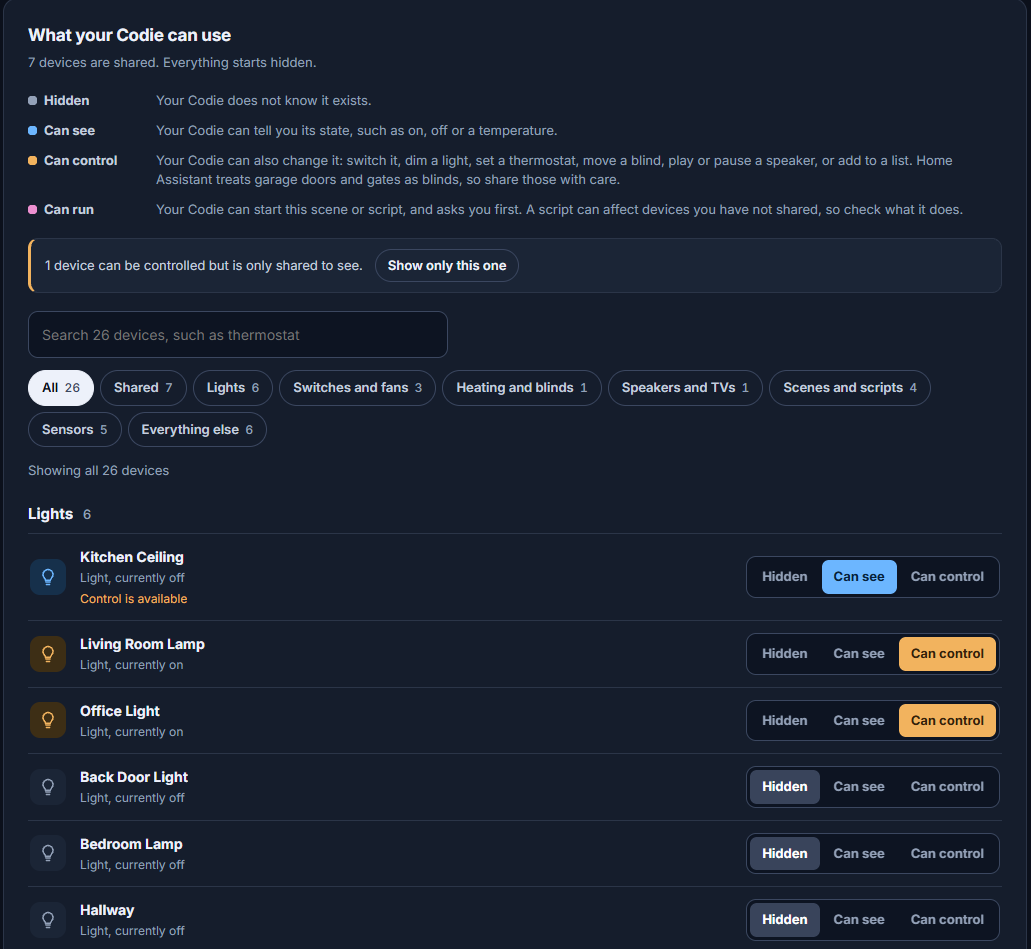
Every device starts hidden. You choose, one by one, whether your Codie can see it, control it, or not know it exists.
Locks and alarms can be seen but never controlled. A garage door only opens if you share it for control, and your Codie is told to ask first.
Search by name or by kind, so the thermostat is easy to find among a hundred devices.
You can always see what happened
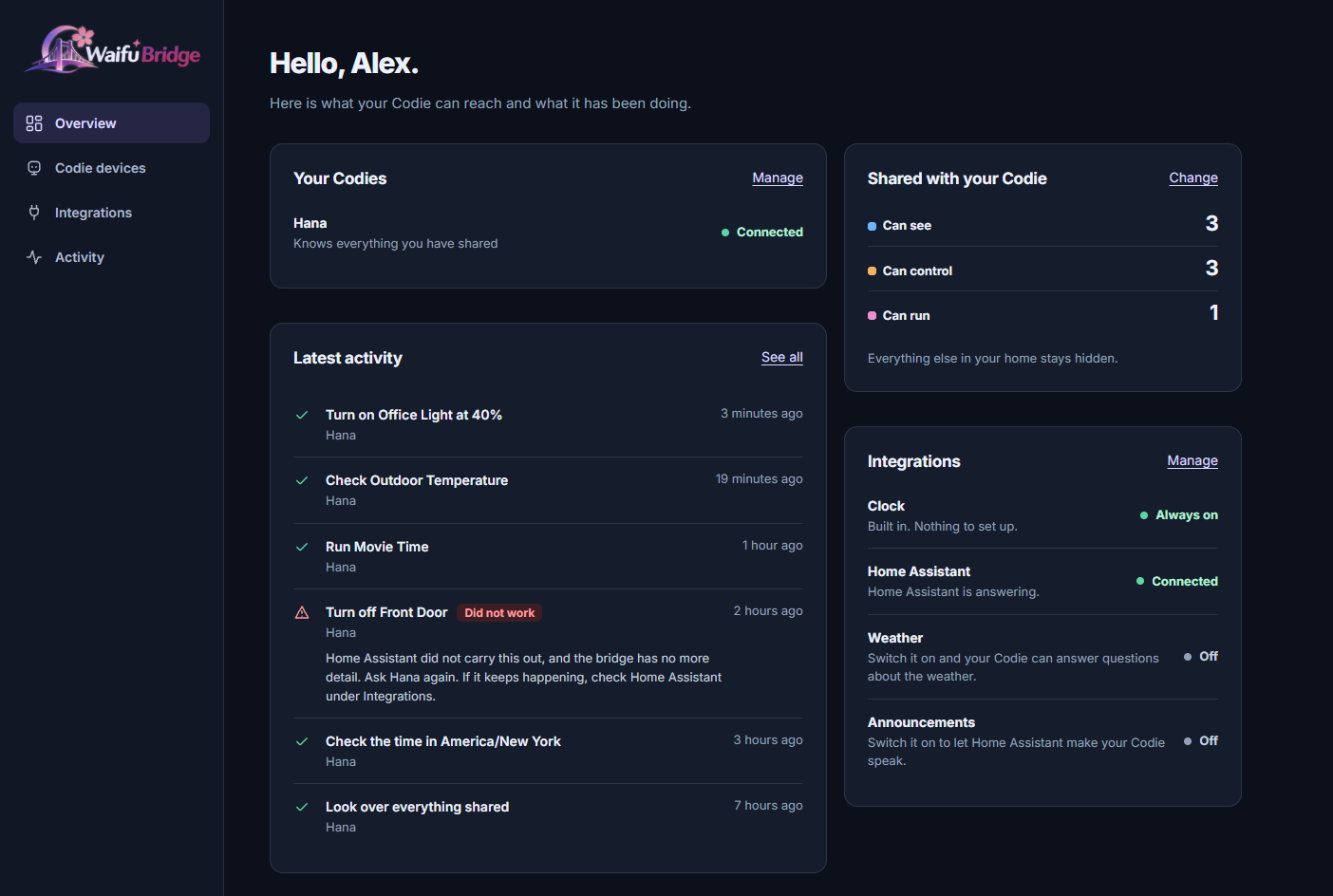
Everything your Codie does through the bridge is listed in plain words, with the time.
When something does not work, the console says why and what to do next. No log files, no error codes to look up.
More than the smart home
Your home can speak up
Home Assistant can make your Codie say something out loud: the washing is done, someone is at the door. Quiet hours and “do not interrupt” are built in.
Choose the AI it thinks with
Keep the built-in AI, or connect your own account with Anthropic, OpenAI, Google, xAI, DeepSeek or Qwen, or a model running on your own computer.
Weather without an account
Pick your town once. Forecasts come from Open-Meteo and need no sign-up.
More than one Codie
Pair as many as you have. One bridge looks after all of them.
It stays in your home
Waifu Bridge runs on your own computer and talks to your Codie over your home network. There is no Waifu Bridge account and no Waifu Bridge cloud.
What never leaves
Your device list, your permissions, your activity log and your Home Assistant access. They are stored on your computer, with saved keys encrypted.
What does go out
A weather request sends a town name or a rounded location to Open-Meteo. If you connect your own AI account, your Codie talks to that provider directly.
What we collect
Nothing. The program does not report back to us, and this website has no trackers.
Up and running in three steps
Start it on a computer that stays on
Any computer on your home network with Docker installed: a mini PC, a home server, a NAS. One file and one command.
Create your account and pair your Codie
Open the console in a browser. Type your Codie’s address, then the six-digit code it shows on its screen.
Choose what it can use
Connect Home Assistant if you have it, and share the devices you are comfortable with. Start a new conversation and ask for a light.
Good to know before you start
Is it really free?
Yes, for personal and other noncommercial use. You can use it, change it and share it. Selling it or using it commercially needs a separate licence. See the license page.
Do I need Home Assistant?
Only for smart-home control and spoken announcements. Weather and choosing the AI work without it. If you do not have Home Assistant yet, it is free and runs on the same kind of computer.
Which Codies does it work with?
Codies running software 1.6.0, which added the local connection the bridge uses. That part of the Codie is still marked as a beta by its maker, so an update to your Codie can change how things behave. We follow those changes as they come.
Do I need to be technical?
You need to be able to install Docker and run one command, or know someone who can do it once. After that, everything is done in a browser, in plain words.
Is this an official CODE27 product?
No. Waifu Bridge is an independent project. It is not made, endorsed or supported by CODE27.